Electronic music is one of the most accessible forms of music creation today. It’s not like most traditional genres that often depend on recording live instruments. Electronic music allows producers to build complete songs using software, virtual instruments, samples, and digital effects. The term covers a wide range of styles, including electronic dance music, house, techno music, dubstep, drum and bass, trance electro music, and many others.
In the world of music production, modern technology has changed the way artists create music. A laptop, a digital audio workstation (DAW), and a pair of headphones are often enough to produce professional-sounding tracks. In fact, many successful artists started with modest setups before upgrading their studios later in their careers.
For beginners interested in producing electronic music, the biggest challenge is often information overload. There are countless plugins, tutorials, synthesizers, and production techniques available online. It can be difficult to know where to start or which tools actually matter.
The good news is that to make music, you don’t need to master everything at once. Electronic music production becomes much easier when you break it into manageable steps.
This guide explains everything you need to know to produce music. This includes equipment and software, composition, arrangement, sound design, mixing, and the mistakes that commonly slow down new producers. With this detailed guide, you’ll learn electronic music production from start to finish in no time.
How Do You Make Electronic Music?
Making electronic music can be simplified into a series of clear steps. Professional studios are a nice-to-have, but you won’t need them to get started.
Below is a simple step-by-step guide on how to produce electronic music:
- Choose music production software, or what’s called a digital audio workstation or DAW. There are different types of DAWs in music production. Make sure to select a DAW that matches your workflow and learning style.
- Create drums and rhythm. Build a beat using kicks, drums, hi-hats, and percussion.
- Add chords and melodies. Write musical ideas that establish the mood and identity of the piece you’re thinking of creating.
- Design bass sounds. Create a bassline that works with your drums and supports the groove.
- Arrange the track. Turn your loop into a full song with sections such as intros, drops, and breakdowns.
- Mix the elements. Balance the volume, EQ, and effects so every sound has its place.
- Master and export the song. Apply final processing and prepare the track for distribution.
That is the foundation when you start making electronic music, such as the deep house genre. Each step builds on the previous one, creating a process used throughout modern electronic music production.
What Do You Need to Make Electronic Music?
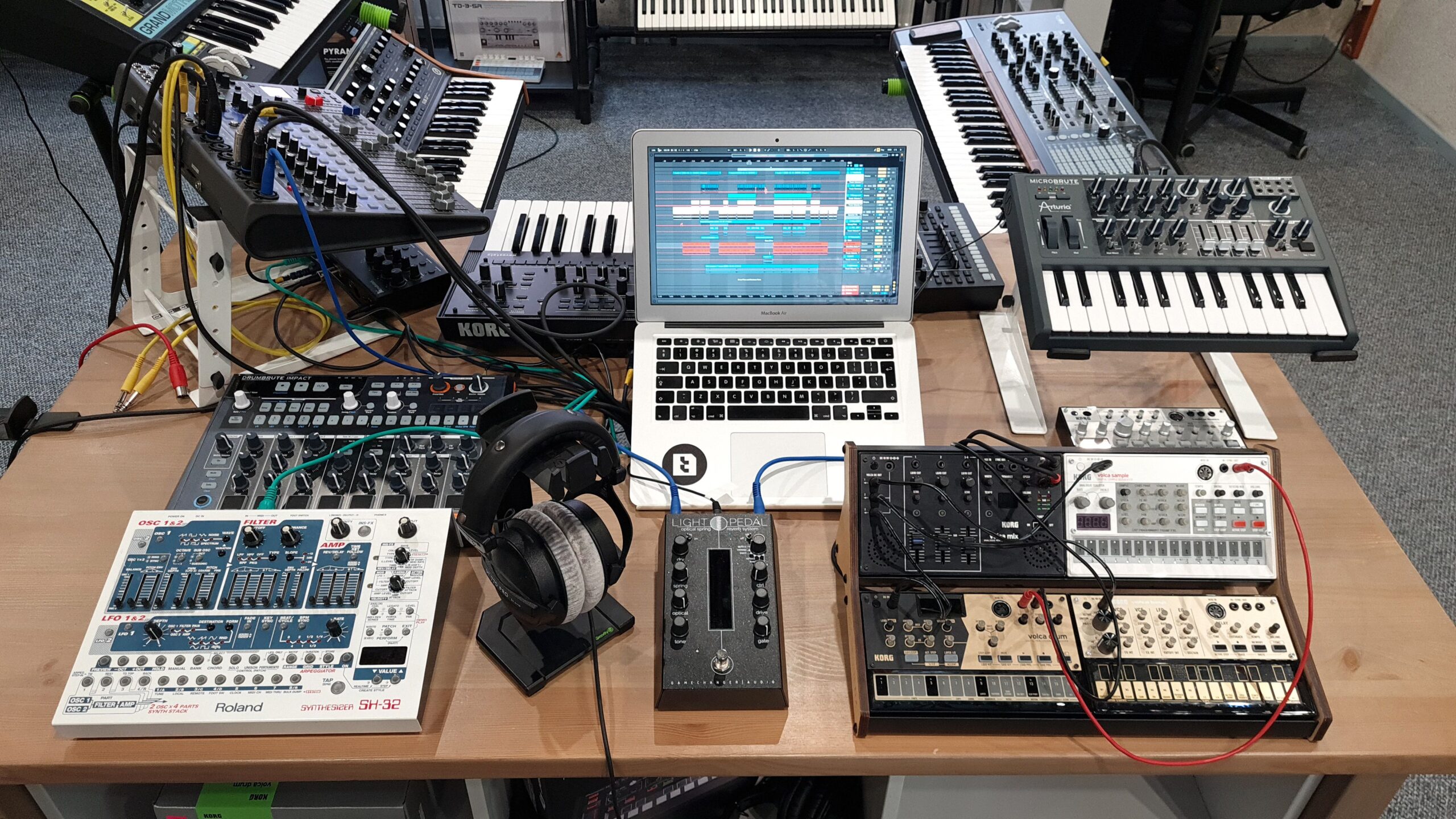
Many beginners assume they need to work in an expensive studio or master music theory before they can start creating tracks. In reality, the minimum requirements to make music are surprisingly simple.
Computer
The computer is the heart of your setup as an electronic musician. Most modern Windows and Mac systems can handle beginner and intermediate projects without difficulty.
A Windows PC often provides more flexibility and upgrade options. Macs, on the other hand, are known for their stability and strong integration with audio software. Neither platform is inherently better for electronic music production. The best choice is usually the one that fits your budget and personal preference.
For beginners, aim for at least:
- A modern multicore processor
- 16 GB of RAM
- Solid state storage
- Reliable internet access for downloads and updates
DAW
A DAW is the software you’ll use to record, arrange, edit, mix, and export music.
If you’re learning how to make electronic music, the DAW will become your main creative environment. Every drum pattern, melody, automation lane, and mix adjustment happens inside this software.
Headphones or Studio Monitors
Monitoring is crucial because it allows you to hear your music accurately.
Good headphones are often the most practical starting point. They cost less than a speaker setup and work well in bedrooms or even shared spaces.
However, studio monitors provide a more natural listening experience. But they require a treated room to deliver their full benefit.
MIDI Keyboard (Optional)
A MIDI keyboard is not required, but it can speed up the composition process.
Many producers find it easier to play melodies and chords instead of drawing every note with a mouse.
Audio Interface (Optional)
An audio interface improves audio quality and reduces latency.
For beginners focused entirely on software instruments, it’s not essential. It becomes more useful when recording vocals, instruments, or using professional monitoring systems.
Basic Equipment Comparison
Equipment | Required? | Purpose |
Computer | Yes | Music production |
DAW | Yes | Create and arrange tracks |
Headphones | Yes | Monitoring |
MIDI Keyboard | Optional | Faster composition |
Audio Interface | Optional | Better audio quality |
The most encouraging fact about electronic music production is that many successful record producers began with little more than a laptop, headphones, and a DAW. Expensive gear can improve one’s efficiency. However, it does not replace skill, talent, creativity, or consistent practice.
Best Software to Make EDM Music
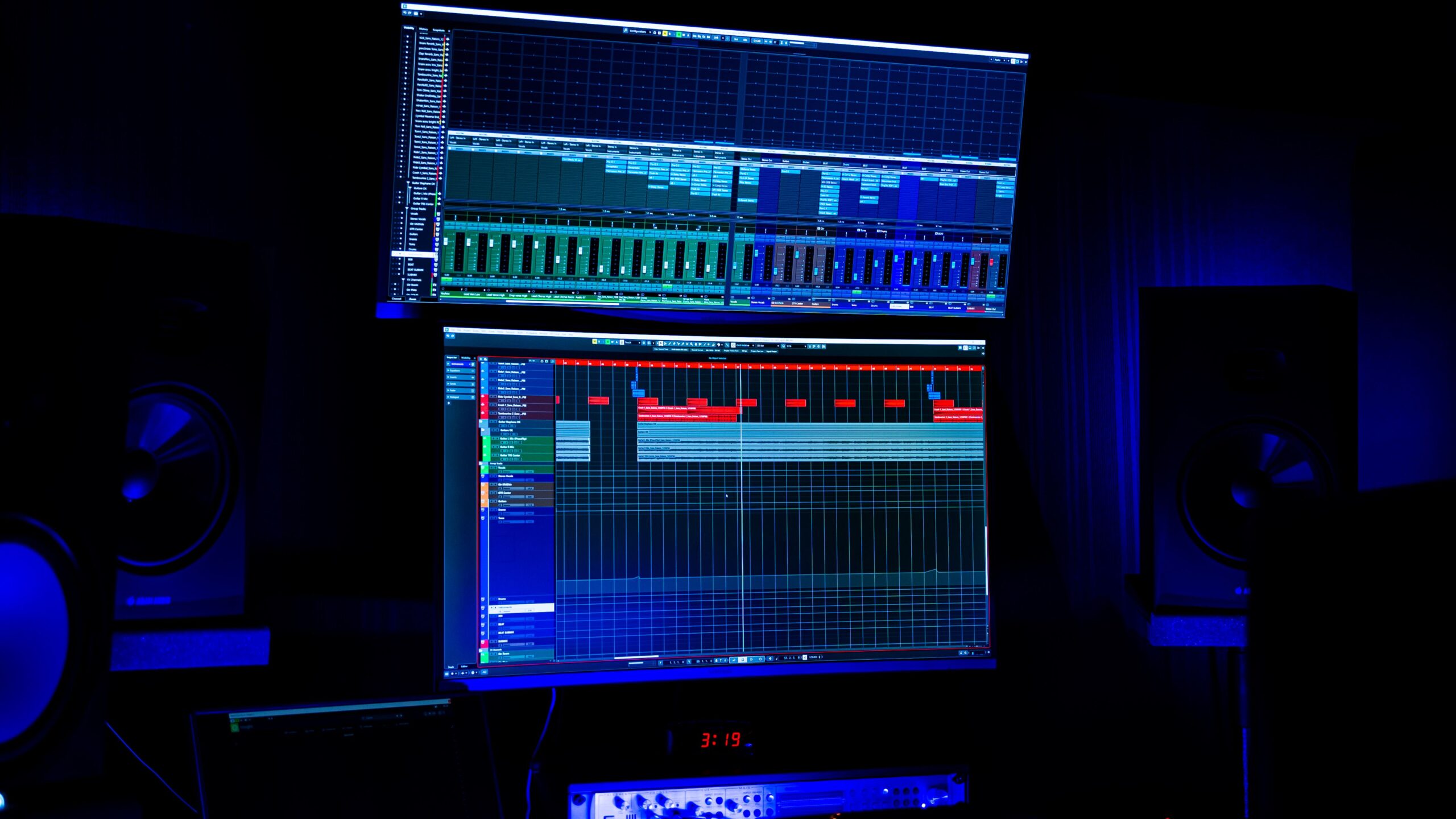
Choosing a DAW is one of the first decisions you’ll make when discovering how to make EDM music. The good news is that there is no single best option.
Most major DAWs can produce professional releases. The right choice depends on your process preferences, learning style, and budget. Check out these popular DAWs:
FL Studio
FL Studio is one of the most popular tools in electronic music production. Its piano roll is widely regarded as one of the best in the industry. With it, producers can quickly program melodies, chords, and basslines with precision.
The software also excels at beat creation. Its pattern-based structure makes it easy to sketch ideas and experiment with arrangements. For many neophytes researching electronic music production, FL Studio provides a beginner-friendly entry point without sacrificing professional features.
Ableton Live
Ableton Live is heavily associated with electronic music, including techno, house, and experimental genres. Its Session View allows record producers to launch clips and test ideas without committing to a traditional timeline. This encourages creativity and rapid experimentation.
Ableton is also highly respected for audio production. Its built-in devices provide powerful tools for synthesis, effects, and automation.
Logic Pro
Logic Pro is available exclusively for Mac users. One reason for its popularity is value for money. The software includes a large collection of instruments, loops, effects, and production tools at a competitive price.
For Mac users interested in electronic music production, Logic Pro offers a complete ecosystem without requiring many additional purchases.
Cubase
Cubase has a long history in professional music production. Its composition features are particularly strong. Advanced MIDI tools help producers develop complex arrangements and detailed musical ideas.
Many professionals continue to use Cubase for both electronic music and traditional composition work, like in pop music.
Studio One
Studio One has gained popularity thanks to its clean interface and efficient workflow.
The software emphasizes drag-and-drop functionality and streamlined production processes. For newcomers looking to learn to create electronic music, Studio One offers a modern, approachable experience.
Online Music Creation Tools
Some users search for ways to make electronic music online. Browser-based music creators and cloud DAWs can be useful learning tools.
Examples include educational production platforms and simplified browser workstations. These can help people who want to learn how to produce music understand sequencing and arrangement concepts.
However, they generally lack the depth and flexibility of professional DAWs. If your goal is serious electronic music production, a dedicated desktop DAW is definitely the better long-term choice.
The Essential Elements of Electronic Music Production
Before learning how to make electronic music in greater detail, it’s essential to understand the building blocks that most tracks use.
Drums
Drums create rhythm and energy. There are different types of drums and percussive elements used in creating electronic music, including:
- Kick: The kick drum is the heartbeat of most electronic music. It provides the steady pulse that listeners instinctively follow, so it’s one of the first music sounds producers add to a new project. In many EDM
styles, such as house and techno, the kick lands on every beat in a pattern known as “four on the floor.” This creates a strong, danceable rhythm that drives the entire track. A good kick also occupies the low-frequency range, giving the song weight and impact. Because the kick and the bassline share similar frequencies, producers spend a lot of time ensuring they work together rather than compete. - Snare: The side drum adds impact and helps define the rhythm. In most electronic music, it appears on the second and fourth beats of each measure. It creates a familiar backbeat that listeners naturally recognize. Beyond marking the rhythm, the side drum creates contrast against the kick. While the kick provides the low-end punch, the side drum cuts through the middle and upper frequencies with a sharper attack. This balance gives the groove more energy and keeps the beat from sounding flat.
- Clap: Although claps often perform a similar rhythmic role as side drums, they create a different feel. A clap has a wider, brighter sound that resembles several people clapping simultaneously. This gives the beat a more open and energetic character. Many EDM producers layer a clap with a side or field drum instead of choosing one or the other. The field drum supplies punch, while the clap adds width and excitement. Together, they produce a stronger backbeat that stands out in busy mixes.
- Hi-hats: Hi-hats are a type of cymbal. They are responsible for much of a track’s movement. They fill the spaces between kicks and side drums, making the rhythm feel smoother and more continuous. Closed hi-hats produce short, crisp sounds that help define the groove. Open hi-hats are longer and brighter, adding energy at key moments. Producers often combine both types to create variation throughout a song.
- Percussion: Percussion includes almost every rhythmic sound beyond the main drum kit. This category covers shakers, tambourines, bongos, congas, rimshots, cowbells, woodblocks, toms, clicks, and many other sounds. While kicks, side drums, and hi-hats establish the main beat, percussion adds detail and personality. It fills empty spaces, introduces syncopation, and gives each track its own identity. Two songs may share the same kick and snare pattern but sound completely different because of the producer’s percussion choices.
Bass
Bass is responsible for much of the power and weight in electronic music. A good bassline supports the rhythm while connecting the drums and harmonic elements. When the bass and kick work together, the entire track feels stronger and more cohesive.
Chords
Chords establish harmony and mood. Bright major chords can sound uplifting and energetic. Minor chords often create emotional, dramatic, or darker atmospheres.
Many producers spend considerable time refining chord progressions because they influence the emotional direction of a track.
Melody
Melodies give songs identity. Listeners often remember a track because of a memorable hook, lead line, or vocal motif. Effective melodies are usually simple enough to remember but interesting enough to hold attention.
Effects
Effects add depth, movement, and character. Common examples include:
- Reverb for space
- Delay for echoes
- Distortion for aggression and texture
- Filters for shaping frequency content
These tools are essential components of modern electronic music production. They help transform simple sounds into engaging musical experiences.
How to Compose Electronic Music Step by Step
Understanding how to make electronic music becomes much easier when you follow a repeatable workflow. The process below reflects a practical approach used by many producers.
Step 1: Choose a Tempo
Tempo is measured in beats per minute (BPM).
Common ranges include:
- House: 120 to 130 BPM
- Techno: 125 to 145 BPM
- Trance: 130 to 140 BPM
- Dubstep: 140 to 150 BPM
- Drum and Bass: 160 to 180 BPM
Choosing the tempo early provides direction for the rest of your project.
Step 2: Build the Drum Groove
Drums usually come first. Many house and electronic music tracks rely on a four-on-the-floor kick pattern, where the kick hits every beat. Start with a basic groove. Then add hi-hats, claps, and percussion layers to increase movement and interest.
When studying how to make electronic music, focus on groove before complexity.
Step 3: Write Chord Progressions
Chords provide emotional context. Start with simple progressions involving three or four chords. This approach allows you to establish a strong foundation before adding extra layers.
Major keys generally sound brighter. Minor keys often create more tension and emotion.
Step 4: Add a Bassline
The relationship between kick and bass is one of the most important aspects of electronic music production. A bassline should support the rhythm rather than compete with it.
Listen carefully to how the low frequencies interact. The goal is to create a solid foundation that enhances the groove.
Step 5: Create a Melody
Many beginners overcomplicate melodies when simple ideas often work best. Repetition helps listeners remember a hook, while small variations keep the music interesting.
If you’re studying how to make electronic music, pay attention to successful tracks. You’ll often find surprisingly simple melodic structures.
Step 6: Add Sound Design Elements
At this stage, begin shaping your sounds. You can start with synthesizer presets and gradually modify them. Adjust filters, envelopes, effects, and automation to create movement.
This is the step where producing electronic music becomes highly creative and personal.
Step 7: Build Transitions
Transitions help connect sections smoothly.
Common tools include:
- Risers: Risers are sounds that gradually increase in pitch, volume, or intensity leading up to a major section, such as a drop. They build anticipation and signal to listeners that something bigger is about to happen.
- Impacts: These are short, powerful sound effects that emphasize important moments, such as the start of a drop, breakdown, or chorus. They add weight and make transitions feel more dramatic.
- White noise sweeps: White noise sweeps use filtered white noise that gradually rises or falls in frequency and volume. Producers use them to create smooth transitions between sections and add energy without introducing new musical notes.
- Reverse effects: These are created by reversing sounds like cymbals, piano notes, or vocal samples so they swell into the next beat. They create a sense of movement and help guide the listener naturally into a new section of the track. These elements create anticipation and help listeners follow the song’s structure.
By following these steps consistently, you’ll develop a stronger understanding of how to make electronic music and finish more projects successfully.

How to Arrange an EDM Track
Many aspiring producers understand how to make electronic music at the loop stage but struggle to transform those ideas into complete songs. Arrangement solves that problem.
A common electronic music structure includes the following:
- Intro: The intro introduces the track’s core elements. Producers often begin with drums, percussion, atmospheres, or filtered versions of future sounds. This section establishes mood without revealing everything immediately.
- Build-Up: The build-up creates tension. Rising pitch effects, increased drum activity, automation, and white-noise sweeps are frequently used to build anticipation.
- Drop: The drop delivers the main energy release. Strong drops typically feature powerful drums, bass, and memorable hooks. The contrast between the build-up and the drop often determines how impactful the section feels.
- Breakdown: The breakdown reduces intensity. Removing drums and emphasizing melodic or atmospheric elements creates contrast. This contrast helps maintain listener engagement throughout the song.
- Second Drop: The second drop usually reintroduces energy while adding variation. New melodies, fills, or sound composition changes help keep the track fresh.
- Outro: The outro provides a natural ending. For DJs, it allows easier transitions between tracks. For streaming listeners, it creates a satisfying conclusion.
A useful arrangement tip for anyone thinking about how to make electronic music is to use reference tracks. Study professionally released songs and observe how sections evolve over time. It’s the same with pop, for example. You need to listen to the greatest pop albums of all time to learn and feel inspired in your productions.
Sound Design for Electronic Music Production
Sound composition is one of the most exciting aspects of producing electronic music. It allows producers to create unique sounds rather than relying entirely on presets.
Fortunately, you do not need advanced engineering knowledge to get started.
What Is a Synthesizer?
A synthesizer is an instrument that generates sound electronically. Instead of recording an acoustic source, a synthesizer generates audio using oscillators and signal-processing tools. Most modern electronic music production relies heavily on synthesizers.
Common Synth Controls
Common synthesizer controls are the basic parameters that producers use to create and shape sounds in a synthesizer. Instead of simply choosing a preset, these controls let you modify how a sound starts, evolves, and behaves over time. Learning them is one of the fastest ways to improve your sound composition skills because the same concepts apply to most modern software and hardware synthesizers.
Here are the most important synth controls and how they contribute to electronic music production:
- Oscillators: Oscillators generate the raw sound. Common waveforms include sine, saw, square, and triangle waves. Each produces a distinct tonal character.
- Filters: Filters remove or emphasize certain frequencies. A low-pass filter, for example, reduces high frequencies and creates a smoother sound.
- Envelopes: Envelopes control how sounds behave over time. They determine how quickly a sound starts, how it changes while playing, and how it fades after a note ends.
- LFOs: LFO stands for low-frequency oscillator. An LFO creates movement by automatically modulating parameters such as pitch, volume, or filter cutoff.
Popular EDM Synthesizers
Several synthesizer plugins have become industry standards, such as:
- Serum: Serum is one of the most popular wavetable synthesizers in electronic music. It has a clean interface, excellent sound quality, and powerful modulation options. It is widely used to create bass, lead, pad, and complex, evolving sounds in genres such as dubstep music, future bass, and house.
- Massive: Massive is a classic wavetable synthesizer known for its aggressive, gritty sound. It became especially popular in dubstep and drum and bass, where producers use it to design heavy basslines, growls, and other hard-hitting synthesizer sounds.
- Sylenth1: Sylenth1 is a virtual analog synthesizer prized for its warm, punchy tone and low CPU usage. Its straightforward interface makes it a favorite for creating supersaws, plucks, basses, and classic electronic music lead sounds.
- Vital: Vital is a modern wavetable synthesizer that offers advanced sound editing features and a highly visual interface that makes it easy to understand how sounds are created. Its generous free version has made it especially popular among beginners and producers looking for a powerful alternative to premium synthesizer plugins.
When studying how to make electronic music, focus on understanding concepts rather than memorizing every feature. A solid grasp of oscillators, filters, envelopes, and LFOs will transfer across nearly every synthesizer you encounter. Then you can create the music you want to produce.
Common Mistakes New Electronic Music Producers Make
Many people learn how to make electronic music through trial and error. Avoiding a few common mistakes can save years of frustration.
- Buying too much equipment too early: New producers often assume gear will solve creative problems. Start with a basic setup and upgrade only when limitations become obvious.
- Using too many plugins: Large plugin collections can slow learning. Master a few core tools before expanding your arsenal.
- Ignoring arrangement: Great loops do not automatically become great songs. Spend time learning song structure and transitions.
- Overcomplicating melodies: Simpler melodies are often more memorable. Focus on strong hooks rather than excessive note counts.
- Skipping reference tracks: Professional tracks provide valuable benchmarks. Regularly compare your work to improve decision-making.
- Not finishing projects: Completing songs teaches skills that unfinished loops never will. Set deadlines and finish tracks, even if they are imperfect.
- Mixing while composing: Constantly adjusting EQ and effects can interrupt creativity. Write first, then dedicate separate sessions to mixing.
Many producers who struggled when they started producing electronic music did so not for a lack of talent. They simply spend too much time on distractions instead of practicing the fundamentals consistently.
Key Takeaways
Learning how to make electronic music is a long-term process, but every completed track builds experience and confidence.
Before you get started, keep the following important points in mind:
- You only need a computer, a DAW, and headphones to begin making tracks.
- Choosing the right DAW is one of the first major decisions in electronic music production.
- The basic workflow for making electronic music includes drums, chords, bass, melody, arrangement, mixing, and mastering.
- Arrangement is often the difference between a good loop and a finished track.
- Good mixing improves clarity, balance, and impact.
- Consistently finishing projects is one of the fastest ways to improve your skills in producing electronic music.
Once you start honing your electronic music production skills, don’t forget to enjoy the process of making your first song.